Free for Outlook 365

Reply faster with reusable email templates

Response Templates for Outlook 365 lets you create, store, and instantly insert pre-written email content – full messages, text snippets, paragraphs, and URLs – directly into any Outlook email with a single click.
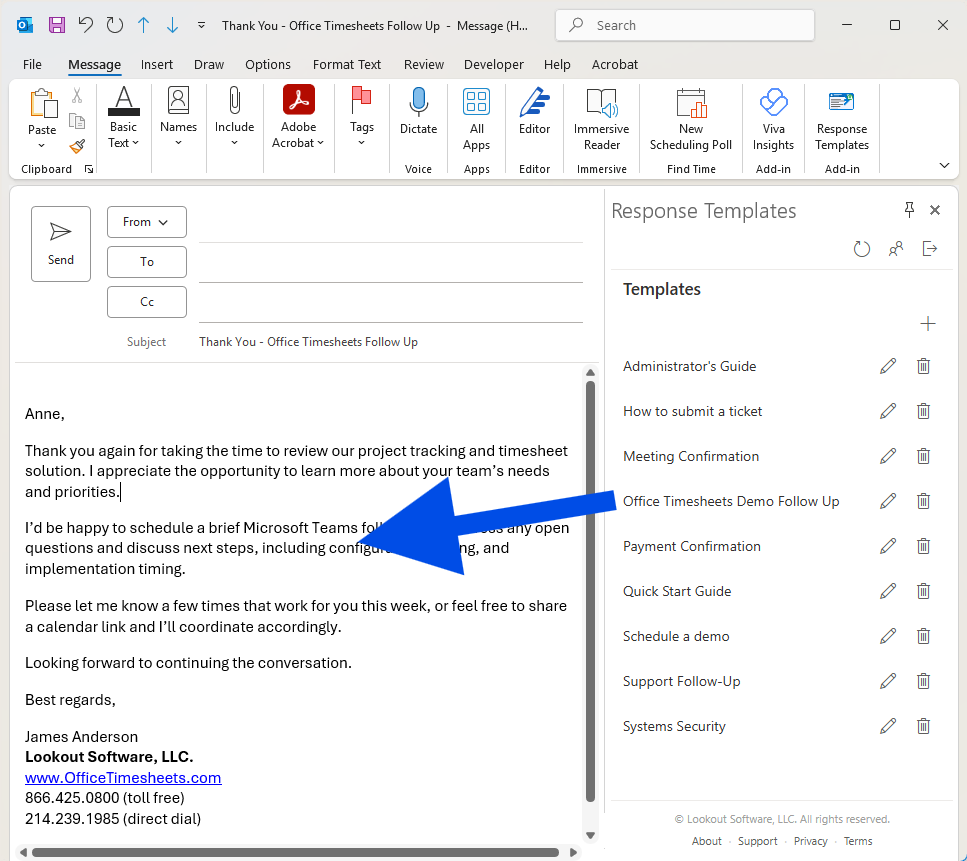
Everything you need to reply in seconds

Stop typing the same responses over and over. Response Templates streamlines your email workflow inside Outlook 365.

One-Click Insertion

Click any stored template in the side panel and it's instantly inserted into your active email – reply, forward, or new message.

Flexible Content Types

Store complete emails, individual paragraphs, short text snippets, sentences, or URLs – whatever you need at your fingertips.

Works Everywhere

Use templates when replying, composing new messages, or forwarding emails. The side panel is always accessible right where you work.

Save Hours Weekly

Eliminate repetitive typing for common responses. Teams handling customer inquiries, support tickets, or routine correspondence see immediate time savings.

Easy to Manage

Create, edit, and organize your templates with an intuitive interface. No complicated setup or configuration required.

Free to Use

Response Templates is offered completely free of charge. Install it from Microsoft AppSource and start using it right away – no subscription or payment required.